Sunday, 24 March 2019

Deleted Files: Where Do They Go?

No one knows where broken hearts go. But do you know where deleted files go? Sure, your deleted files go to the recycle bin. Once you right click on a file and choose delete, it ends up there. However, that doesn’t mean the file is deleted because it's not. It’s simply in a different folder location, one that’s labeled recycle bin. From there, you can easily restore the file anytime you want to.

Emptying out the recycle bin doesn’t necessarily mean that your files are permanently deleted. It might seem like it but that’s not exactly the case.

When a computer deletes a file or the Recycle Bin is emptied, it is removing the reference to the file on the hard drive. Once the file header, or reference, is removed, the computer can no longer see the file. The space the file took up is no longer reserved for that file, and any new file can be stored in that location.
What does this mean? The file is no longer readable by the computer. However, the file is still on the hard drive, at least until another file or part of another file is saved to the same location.

(Via: https://www.computerhope.com/issues/ch001463.htm)

The files deleted from the recycle bin are still in the computer. Although they can’t easily be accessed, they’re not actually removed or deleted. That’s really something to think about. That is, if you really want to delete a file. After all, not everything in your computer is worth keeping. Some files are probably just junk or maybe just bad memories that you want to forget. Even worse, some files are probably deep, dark secrets that you don’t want anyone to know about.

The point is, some files are probably not bringing you joy anymore. According to “KonMari,” the popular method of tidying up, if something does not give you joy, get rid of it. Just in case you’ve been living in a cave and you haven’t heard of the “KonMari” method, here’s what it tells you to do.

It asks you to choose what to keep, not what to throw away. Holding each item you possess in your hands, ask yourself if it “sparks joy.” Yes? Keep it. No? Discard it.

(Via: https://www.thespruce.com/the-konmari-method-4138610)

The same method could easily be applied if you want to tidy up your computer. The thing is, it takes some time to really get rid of a file. Even after you've deleted it, it’s still there. The hard drive of your computer stores it until another file overwrites it.

The storage space that was once the file you deleted is seen by the operating system as free space that can be used for storing new files. If the free space that was once a file happens to be used by the operating system to store new data, the content of the original deleted file is overwritten. In that case, there is little chance to recover the deleted file.

(Via: https://www.digitalcitizen.life/simple-questions-what-happens-deleted-files-why-can-they-be-recovered)

It takes some time to really get rid of deleted files. That could be good or bad for you, depending on the situation. If you need to recover a file, then it’s good for you. However, it might be bad for you if you want to sell or simply get rid of your computer.

If files you’ve deleted could still be unearthed by experts that means anyone who steals your computer or buys it legitimately could potentially restore the files you thought you had deleted. That could lead to some costly incidents. To protect yourself, remove the hard drive from any computer you’re planning to sell. That’s the only way to ensure that no one can find and restore data that you have tried to delete.

(Via: http://www.geekrescue.com/blog/2014/03/04/are-deleted-files-really-gone-forever)

All the bits and pieces of data are in the hard drive. Whether they’re deleted or not, they are all stored in the hard drive. In case of data loss, the hard drive is the key to salvation. Unfortunately, hard drive recovery is not that easy. It’s better to leave it to the experts at https://www.harddriverecovery.org/, who can provide professional https://www.harddriverecovery.org/data-recovery-services.html.

Deleted Files: Where Do They Go? is republished from http://www.harddriverecovery.org


source https://www.harddriverecovery.org/blog/deleted-files/

Sunday, 17 March 2019

Hard Drives: Two Critical Things You Should Know About Them

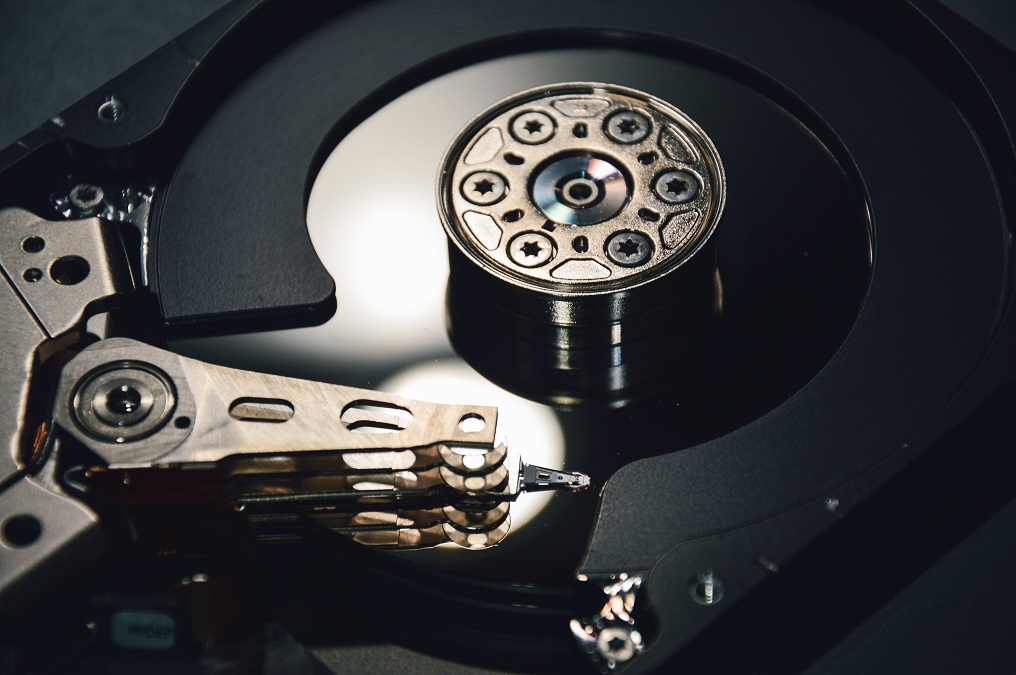
Hard drives. How much do you know about them? Well, here's a little trivia for you. Decades ago, hard drive meant something else. For regular folks like you and me, hard drive was definitely not defined as an object. Back in the days, hard drive was far from being an object. In this day and age, it’s a lot different. Hard drive now refers to the hardware device found inside a computer. Hard drive or hard disk drive is where all the data are stored.

In many respects, the hard drive is your computer. It’s where all the data in your computer is stored for the long term — not just the things you save, but all the code required for your operating system, the framework browsers use to connect to the internet, drivers for your accessories, and everything else. When people talk about computer storage, they are talking about the hard drive.

(Via: https://www.digitaltrends.com/computing/what-is-a-hard-drive-your-guide-to-computer-storage)

A computer would definitely be useless without a hard drive. But that wasn’t the case in the early days. It's quite interesting to know that data storage was a lot different in those days. As a matter of fact, hard drives didn’t even exist then.

In the very early days, computers didn’t have hard drives at all, so they needed different ways to store data so that it could be accessed when necessary. Those old timey ways included rolls of magnetic tape inscribed with data, and yes, punch cards that could be slotted in and read by the computer.

(Via: https://www.digitaltrends.com/computing/what-is-a-hard-drive-your-guide-to-computer-storage)

Thanks to Reynold Johnson, the hard drive was invented. The year was 1956 when Reynold Johnson developed the pioneering process of storing data in metal disk. This was a breakthrough because at that time, data were being stored in a magnetic tape or drum.

The first real hard drive was developed by Reynold B. Johnson at IBM, in 1956. Johnson’s team was working with better ways to store data on things like magnetic tape. They created ways to store information (in the form of bytes) on magnetic disks instead, which could be overwritten with new information as desired. This led to the development of an automated disk that could read itself in a manner similar to a record player — except much larger.

(Via: https://www.digitaltrends.com/computing/what-is-a-hard-drive-your-guide-to-computer-storage)

Those are just a few cool things to know about a hard drive. The evolution of which is really quite interesting. Aside from those cool and interesting things about a hard drive, there are crucial things that you should know about it as well. The first of which is this; hard drives don't last forever. As much as you or anybody would want to make it last forever, they just don't. Hard drives have a lifespan.

Traditional hard drives (also known as HDDs), which you’ll usually find in desktop computers and some cheaper laptops, will often fail sooner because they use moving parts. The average life of a hard drive depends on a lot of things, like the brand, type, size, and interface method, but you’re looking at about four years on average.

(Via: https://lifehacker.com/how-long-will-my-hard-drives-really-last-1700405627)

The most you could do is to prolong the lifespan of your hard drive through regular maintenance checks. That's all. Still, the day will come when your hard drive will fail you. Sounds like the end of the world but it's not. You see, the second critical thing to know about your hard drive is that the data stored in it can be recovered. There's a good chance for you to get your data back as long as you don’t open your hard drive. The tips on https://www.harddriverecovery.org/hard-drive-recovery.html will come in very handy the day your hard drive fails.

Hard Drives: Two Critical Things You Should Know About Them is republished from http://www.harddriverecovery.org


source https://www.harddriverecovery.org/blog/hard-drives-two-critical-things-you-should-know-about-them/

Sunday, 10 March 2019

The Best, If Not The Safest Way To Data Recovery

There’s nothing simple about data recovery.  This process of salvaging deleted data on a hard drive can easily scare anybody. If you have no IT background, you’re bound to panic, and quickly get above your head looking for a fix.  Imagine losing all your irreplaceable data and not knowing how to get them back can really send shivers down your spine. Who can blame you? After all, there are a lot of data stored in that hard drive of yours.

According to a study on second hand hard disk drives, it was found that more than half of them contained some very critical data.

A new study from technology firm Blancco Technology Group found that 78%— more than three quarters—of used, resold, or refurbished hard disk drives still contained personal or confidential information, despite supposedly being “wiped.”

In the first quarter of 2016, the group purchased a total of 200 used hard disk drives and solid state drives sold in the United States from eBay and Craigslist. Out of the 200, the Blancco’s digital forensics team was able to recover left-over data from 78% of the drives, according to the study.

(Via: http://fortune.com/2016/06/28/study-resold-drives-personal-business-data)

If you’re wondering what kind of data were recovered from the 200 used hard disk drives, well, here’s an alarming breakdown.

As for personal information, over half (67%) of the drives contained things like photos (43%), social security numbers (23%), and financial data (21%).

(Via: http://fortune.com/2016/06/28/study-resold-drives-personal-business-data)

The point is, you probably have that much data in your hard drive as well. Since you can’t access them, you panic. To panic is probably the only thing you can do. It might not be a logical thing to do but it is something you’re most likely to end up doing.

With no backups, whatsoever, you’re feeling totally hopeless. How in the world can you actually recover the precious data you accidentally deleted? Calm down because you can.

Today, with the ever expanding technological advances, there are many ways to help you recover data. However, if done incorrectly, then you could risk damaging the hard drive even further or overwriting what you are trying to retrieve.

(Via:https://www.streetdirectory.com/travel_guide/114062/data_recovery/an_overview_on_data_recovery.html)

That’s the thing. How in the world can you or anybody else, for that matter, restore data from a damaged hard drive? That’s not the easiest thing to do especially in a state of panic and hopelessness. If you can’t do it properly, then you’re bound to lose your precious data forever. Even if there are simple ways to recover data, you would have to make sure they’re applicable to your situation. The fact is, the data recovery process depends on various circumstances. Needless to say, it also relies on stable emotions. Being in a state of panic pretty much disqualifies you from performing a safe and even simple data recovery.

The data recovery process varies, depending on the circumstances of the data loss, the data recovery software used to create the backup and the backup target media. For example, many desktop and laptop backup software platforms allow users to restore lost files themselves, while restoration of a corrupted database from a tape backup is a more complicated process that requires IT intervention. Data recovery services can also be used to retrieve files that were not backed up and accidentally deleted from a computer's file system, but still remain on the hard disk in fragments.

(Via:https://searchdisasterrecovery.techtarget.com/definition/data-recovery)

Data recovery can get pretty technical for a regular computer-user. So, should you even dare to recover your data? Well, if you’re not confident, don’t even dare. The most you should do is to deal with your emotions. Calm down from the state of panic and leave the seemingly hopeless situation to the experts.

After all, there is a safe way to data recovery. If you check out the services on https://www.harddriverecovery.org/data-recovery-services.html, you’ll find that it’s a lot safer to leave data recovery to the experts.

The following article The Best, If Not The Safest Way To Data Recovery See more on: HDRG


source https://www.harddriverecovery.org/blog/data-recovery/

Sunday, 3 March 2019

Should You Consider A Hard Drive Recovery Service?

Consumers want convenience. That’s a fact. When it comes to convenience in this day and age, we, consumers, turn to software or apps. One good example is relying on a cloud-based software to back up our data.

Cloud backup is primarily used on an individual's or organization’s data via an offsite and remote cloud storage platform. Cloud backup works when a cloud backup provider allocates cloud storage that is accessible globally over the Internet or backup software via a purpose-built user interface or vendor API. Cloud backup storage can be used to virtually store and back up all types of data or applications. Unlike traditional backup techniques, cloud backup is highly flexible and scalable in scaling up and down on run time.

(Via: https://www.techopedia.com/definition/13587/cloud-backup)

If you think about, cloud backup is very convenient. With everything stored in the cloud, you don’t have to worry about capacity. You’ll probably just have to pay for it but you’ll be spared from worrying about it. You won't have to put in so much effort in figuring out where to store data since you can always just rely on the cloud. That does sound pretty cool, don't you think?

While it’s convenient, you might have some reservations about it. If you’re a paranoid internet-user, you might have some questions about the reliability of the cloud. Is it safe enough to protect your data? Congratulations for being a paranoid, if not, a smart internet-user because that’s actually a very valid thought.

Businesses have long been skeptical about storing data in the cloud, citing security concerns. Though most cloud services use basic security functions such as logins and user passwords, today’s hackers are finding their way around those protocols with relative ease. In addition, if your industry is highly regulated, let’s say you work in healthcare or finance, vendor security measures may not be enough to maintain compliance with those standards, putting critical data at risk. This is where an on-premise or hybrid tool may make the most sense, as keeping local backups handy can ensure that all of the most important data isn’t just floating out there in cyberspace.

(Via: https://solutionsreview.com/backup-disaster-recovery/top-4-risks-associated-with-cloud-backup)

This is not to say that you shouldn’t back up our data because you should. As a matter of fact, everybody should. It’s important to back up files. Why wait for the moment of regret?

It you do decide to rely on a backup software, you just have to make sure that it’s safe and reliable. However, you shouldn’t expect too much from our backup software. Since its sole purpose it to back up data, you shouldn’t expect that it can recover them as well.

More and more companies are adopting cloud services. Cloud-based disaster recovery claims lower costs and faster and have more flexible solutions for backing up a company's data. Should you put all your eggs in one basket? While rare, it does happen where companies can lose their data and backup data at the same time. This catastrophic loss occurred on June 17, 2014 with Codespaces.com, a Software as a Service company, which did not have a proper cloud storage backup. The company used the popular Amazon Web Services (AWS) and stored their data in the cloud. A hacker gained control of the company's AWS online administrator console account and mounted a denial of service (DDOS) attack. When Code Spaces tried to take back control by changing passwords, the hacker wiped out their entire company -- including all data and all backups.

(Via: https://www.huffingtonpost.ca/matthew-held/disaster-recovery-organizations_b_13800538.html)

So, does that mean you should avail of a hard drive recovery service in case of data loss? The answer is yes because if your cloud backup fails, you'll have another way to get back your data.

Even if your cloud backup does not fail, it might take you some time to get back your data. With cloud backup relying heavily on internet connection, it might take hours or even days to restore your data. That might not work for you're  in an urgent or even desperate situation to get back your data.

According to https://www.harddriverecovery.org/data-recovery-services.html, only professional data recovery technicians can decipher if data can be recovered by a software or by a remote data recovery service. So if you want to restore any lost data as soon as possible, a quick call to the experts at https://www.harddriverecovery.org/ is the best thing to do.

The following article Should You Consider A Hard Drive Recovery Service? is available on http://www.harddriverecovery.org


source https://www.harddriverecovery.org/blog/should-you-consider-a-hard-drive-recovery-service/

Tuesday, 26 February 2019

How To Deal With A Hard Drive Problem

Your  hard drive stores data. In case things go wrong, you can always rely on it to get back your data. Sounds pretty easy, doesn’t it? But what if your hard drive fails you? How are you supposed to get back your data when your hard drive fails? You don't have to wait for your hard drive to fail.  You're better off knowing the warning signs.

Most components on a PC that can fail will give some warning of their deteriorating condition before they just stop working altogether, and hard drives are no exception. Here are some warning signs of a developing hard drive problem. Disappearing files: If a file simply disappears from your system, this can be a sign that the hard drive is developing issues. Computer freezing: Computer freeze up from time to time, and it’s almost always solved by a quick reboot. However, if you find that you need to reboot more and more frequently, that could be an indication that your hard drive is beginning to fail. Corrupted data: If files on the drive are suddenly corrupted or unreadable for no apparent reason, it’s possible that your hard drive is experiencing a gradual failure. Bad sectors: If you start receiving error messages about “bad sectors”, “CRC” or “Cyclic Redundancy Error”, that is a sure sign that your drive is developing problems. Sounds: If your hard drive is making sounds that you aren’t familiar with, this could also be bad news, particularly if it’s a grinding, clicking or screeching noise.

(Via: https://www.techjunkie.com/hard-drive-failure-warnings-and-solutions)

These are warnings that could lead to serious hard drive problems. If you’re not a techy person, the list could possibly scare you. Even worse, you might even ignore the warning signs.

If you can’t find the time or interest to pay attention to the warning signs, you’re doomed to lose some critical data. If that doesn’t scare you still, you might even lose your computer.

But even though software and hardware have gotten a lot better over the years there are still some problems that you have to deal with when it comes to computers. It is what you do what the problems that face you that will determine whether your computer runs well or not later on down the road.

(Via: http://www.security-faqs.com/do-not-ignore-the-error-warnings-that-you-get-on-your-computer.html)

It’s really common sense. The sooner you deal with a hard drive problem, the better. A huge part of dealing with a hard drive problem is to back up data right away.

Do not rely on signs or software to tell you whether you have a failing hard drive. It is more likely than not that it will fail unexpectedly and without any warning signs whatsoever. Rather than trying to forecast something that is even less predictable than the weather, you should rely on backups.

(Via: https://www.makeuseof.com/tag/5-signs-hard-drive-lifetime)

After you’ve backed up your data, make sure to allocate a budget for a new computer. If you’ve ignored the warning signs for too long, you might just have to get yourself a new computer set up. Of course, that's the worst case scenario that you wouldn't to happen.

Another smart way to deal with a hard drive problem is to be proactive about it. Expect that it can happen to you anytime. Don’t forecast the death of your hard drive based on its expected lifespan.

The reality is that, anything can happen within the limited lifespan of hard drive. So if you’ve been ignoring the warning signs simply because your computer is still basically new, then you might be in for a surprise. There’s just no guarantee.

Like every piece of hardware, hard drives can fail. Mechanical hard drives in particular have moving parts that can (and eventually will) stop working. Even solid-state drives, which have no moving parts, can fail. Every drive has a limited lifespan before it kicks the bucket.

(Via: https://www.howtogeek.com/341268/what-to-do-when-your-hard-drive-fails)

Encountering a hard drive problem maybe tough but it’s definitely not hopeless. Truth is, a dead hard drive can still be fixed to recover data.  If you check out https://www.harddriverecovery.org/hard-drive-recovery.html, you will see that hard drive recovery help is just a call away.

How To Deal With A Hard Drive Problem Read more on: http://www.harddriverecovery.org


source https://www.harddriverecovery.org/blog/how-to-deal-with-a-hard-drive-problem/

Tuesday, 19 February 2019

The Importance Of Having A Data Recovery Process

You need a data recovery process. Why? Well, because it hurts to lose data. It hurts even more when you lose them at a time when you need them most. In most cases, data loss happens at a time when you least expect it. Are you prepared when something like that happens? Chances are, you’re not. So, you end up panicking about losing your data.  Who wouldn’t panic about data loss? As much as possible, data loss is something you want to avoid but that’s totally impossible. It’s bound to happen. Unfortunately, you have a lot to lose when data loss happens.

Data may mean different things to different people. It means one thing to financial people and another thing to operations managers, human resources functions, and so on. It includes your intellectual property, customer records, employee identities, financial performance and much, much, more.

Data holds all the secrets to your competitive advantage, product innovation and future plans. It includes everything that interests all your of stakeholders. And, data leaks or criminal theft closes companies every day – pending their recovery or death.

(Via: https://www.dataversity.net/5-reasons-organization-needs-data-loss-prevention)

Data loss is a serious threat to any organization or to any individual for that matter. When you lose data, you’d really have to exert extra effort to recover them as soon possible. The sooner you get them back, the better.  You or anybody else for that matter, can’t afford data loss. Critical data shouldn’t be floating around for the thieves to have to access to. Lost data should immediately be retrieved. That’s the reason why everybody should have a data recovery process in place.

Speaking in simple terms, data recovery is like fixing broken toys with glue and making them usable again. The broken toys and damaged storage media are related because, similar to the way the glue is used to fix the broken toys, with the help of data recovery software and services, your lost and inaccessible data can become usable again.

In technical terms, data recovery is a set of advanced methods used to recover lost data or information.

(Via: https://www.lifehack.org/502466/why-data-recovery-important)

For a quick data recovery process, you can choose from a variety of methods available the market. For example, a data recovery software can repair and recover databases, data files, corrupted partitions and storage media. While it’s in the process of repairing and recovering, your data is safely put back to its original place. You don’t have to do much to get back your data. At the same time, you have a data recovery process in place in case the inevitable happens.

Data recovery software is designed to scour the drive and locate any recoverable data, piecing it back together and providing it in a salvageable format. The best data recovery applications provide a preview of recovered files, filtered and searchable results, easy file restoration and additional tools.

https://www.toptenreviews.com/software/articles/how-does-data-recovery-software-work/

Leaving your data recovery process to the experts is also a very reliable method that you can consider. That is, if you really value your data. Data recovery experts will work hard to save your hard drive. There’s even a good chance of data recovery when you turn to the experts. If not for anything, the personal interaction you can have with an expert at a time when you’re desperate to get back your data is a big deal. A data recovery process with a personal touch beats any kind of software for that matter.

The experts from https://www.harddriverecovery.org/data_recovery_process.html make it very easy for you. They will diagnose the situation and eventually perform a data recovery process to get back critical information that has been lost.

There is no doubt that you need a data recovery process to lessen the dangers of data loss.


The Importance Of Having A Data Recovery Process was originally published to http://www.harddriverecovery.org


source https://www.harddriverecovery.org/blog/data-recovery-process/

Monday, 4 February 2019

Surviving The Blue Screen Of Death

I really thought it was nothing. A blue screen appeared on my computer and I thought it was just one of those minor issues. After all, it was just sad face on a blue screen. How bad could it be, right? Well, I was wrong. I waited for my computer to restart but it never happened. I used another computer to research about the blue screen I was seeing. That was when I learned about the blue screen of death or BSoD.

Blue screens are generally caused by problems with your computer’s hardware or issues with its hardware driver software. Sometimes, they can be caused by issues with low-level software running in the Windows kernel. Regular apps usually won’t be able to cause blue screens. If an app crashes, it will do so without taking the operating system out with it.

(Via: https://www.howtogeek.com/163452/everything-you-need-to-know-about-the-blue-screen-of-death)

I tried troubleshooting the BSoD but I couldn’t do it myself. There were a lot of ways to troubleshoot it, based on the research I did online. Unfortunately, none of them worked for me. Truth be told, some of the ways to troubleshoot a BSoD sounded pretty technical.

In my futile attempt to troubleshoot the BSoD, my computer just kept on restarting. Each time it did, the BSoD just kept on coming back. That was when I really started to panic. Then it dawned on me; was I going to get back my files?

I had no idea at that point. So, I shut down my computer and sought help. Since then, I’ve not seen the BSoD. I hope I don’t see it soon. After that experience, I’d like to share that there’s life after experiencing the BSoD.  It maybe an annoying experience but the BSoD is not that bad after all.

Although a BSoD won't damage your hardware, it can ruin your day. You're busy working or playing, and suddenly everything stops. You'll have to reboot the computer, then reload the programs and files you had open, and only after all that get back to work.

And you may have to do some of that work over. When Windows crashes, it takes everything in RAM with it. If you were working on, say, a document, you will lose everything written since your word processor last saved to disk.

BSoDs have another negative effect: They encourage sociably unacceptable language. If there's a young child within earshot when your screen goes blue, their vocabulary may go blue in another meaning of the word.

Aside from these problems, a single, rare BSoD is nothing to worry about. But if they start happening frequently, you've got a problem that needs to be addressed.

(Via: https://www.pcworld.com/article/2026248/can-a-bsod-hurt-my-computer-.html)

I must admit that I was guilty of blurting out some sociably unacceptable language, which, of course, stemmed from the sheer frustration of not being able to resolve the issue. Then again, that’s not a good excuse.

For a non-techy person like me, the best way to survive the BSoD is to seek help. Going online to find possible ways to troubleshoot it just pretty much confused me. I actually found it quite hard to understand all the possible ways to troubleshoot the BSoD in the midst of a panic attack. I feared for my files. I just couldn’t afford to lose them.

I’ve moved on since then. I survived the BSoD. All my files are back. If it does happen again, I’m going to seek technical help from an expert. It’s worth it to get with an experienced technician to resolve the issue. Needless to say, it saves a lot of time.

The BSoD is just one of the many issues a computer-user, like me, can experience in a lifetime. There are other serious issues that can lead to computer failure and data loss. For serious computer issues that result to data loss, the tips on https://www.harddriverecovery.org/hard-drive-crash.html are very useful.

The article Surviving The Blue Screen Of Death was initially seen on www.harddriverecovery.org


source https://www.harddriverecovery.org/blog/surviving-the-blue-screen-of-death/

Data Recovery Expert: How To Celebrate A Holiday In Lockdown

Irvine, CA-based Hard Drive Recovery Group (HDRG) is encouraging their community to avoid being disheartened by the fact that they have had ...